Family meal planner
Plan the week's meals in minutes, not on Sunday night.
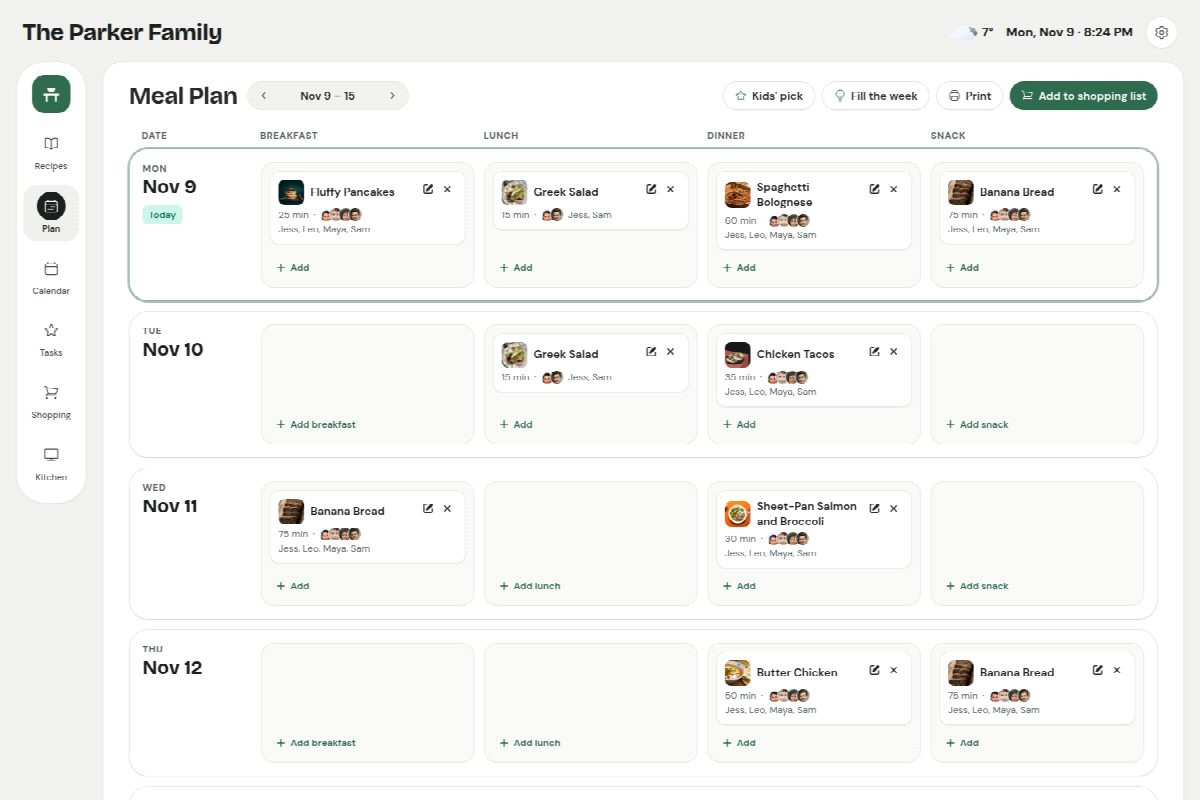
Put recipes on each day, let the kids pick one, and send everything the week needs to the shopping list, scaled to the family and sorted by aisle.
Recipes from anywhere
Save recipes from any website, a video, or a photo of a recipe card, then put them on the week. Everything stays in your family's own recipe box.
Repeat what works
Make Taco Tuesday or Pizza Friday repeat every week, and fill the open dinners from the meals your family rates best.
Kids get a say
Each child can pick a dinner a week. Thumbs up and down after a meal show what to make again.
Leftovers and budget
Mark a dinner as making leftovers and tomorrow's lunch is planned. Give recipes a cost and see the week against your budget.
How it works
- 1 Save a few favourite recipes from the sites you already use.
- 2 Put them on the week, or tap Fill the week.
- 3 Send the ingredients to the shopping list, and cook from the recipe with the screen kept on.
Questions
Can I save recipes from any website?
Yes. Paste a link, use the Save button in your browser, or share it from your phone. Sites that block apps can be saved from your own browser, and a photo or screenshot of a recipe works too.
Does it make the shopping list for me?
Yes. Add from this week's meals and pick what you need: amounts are scaled to how many are eating, duplicates are merged, and pantry staples you always have are left off.
Can I print the meal plan?
Yes, the week's plan and the shopping list both print, or save as a PDF for the fridge.
Recipes, meals, lists, calendar and routines, together.
One price for the whole household, on the phones and tablets you already have.