Shared grocery list
One grocery list the whole family can add to.
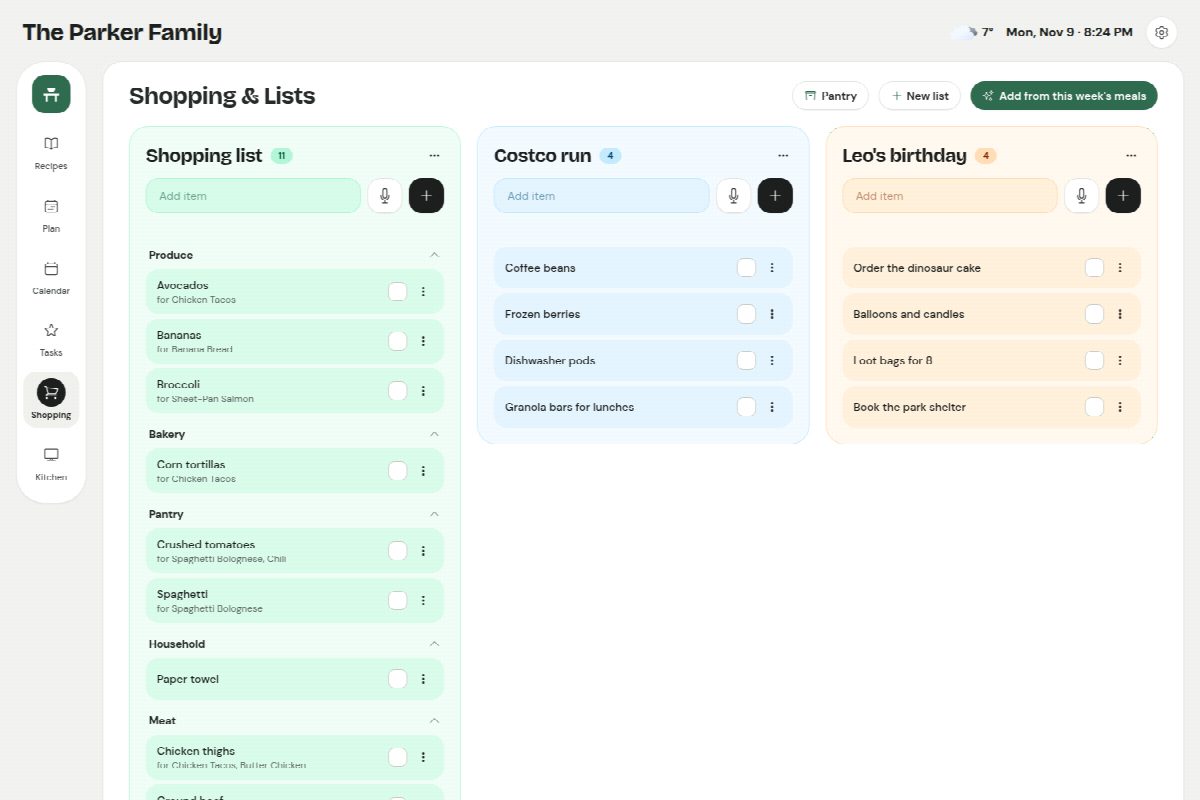
Whoever notices the milk is gone adds it, and whoever is at the store sees it straight away, sorted by aisle, on their own phone.
Changes in a second or two
Tick something off at the store and it's gone from everyone's list at home, on every phone and the kitchen screen.
Works with no signal
Keep ticking things off in the back of the store. The list catches up as soon as you're back in range.
Filled from the meal plan
Add what the week's meals need in one go, each item showing which recipe it's for.
As many lists as you like
Costco, the hardware store, a birthday party, the camping trip: each its own list, and the kids can add to them too.
How it works
- 1 Add things by typing or just saying them: "milk, eggs and bananas".
- 2 Everyone in the family sees the same list on their phone.
- 3 Tick things off in the store, sorted by aisle, even offline.
Questions
Does everyone need their own account?
Each adult signs in with their own email, all in one household, with no charge per person. Kids can add to lists on the kitchen screen without a login.
Can I use it without an app?
Yes. It runs in any phone's browser and can be added to the home screen like an app, on iPhone and Android.
Does it remember prices?
Add a price to an item once and it's filled in next time, so the list shows roughly what the shop will cost.
Recipes, meals, lists, calendar and routines, together.
One price for the whole household, on the phones and tablets you already have.